The YTD tab launches a window to input data about taxable events that have elapsed in the current year. Capturing events such as account distributions, realized capital gains, and more helps the system provide more accurate tax projections for the current year. This can be especially helpful when assessing how much room in the current tax bracket remains for potential Roth conversions. The withholding options also allow you to avoid the projected account withdrawals for the remainder of the year attempting to satisfy taxes that have already been paid on income that has elapsed.
Income known to the system to have already elapsed based on the provided start date/event is automatically captured. These can include any source from the Income tab, Social Security for clients who are marked Already Claimed, and contractual annuity income. All inputs in this area are optional.
The date range relevant to inputs made under YTD is reflected in the descriptive text and will always be from January of the current year, through the end of the current month. The data captured here is applicable regardless of whether the first retirement date has passed or is still in the future.
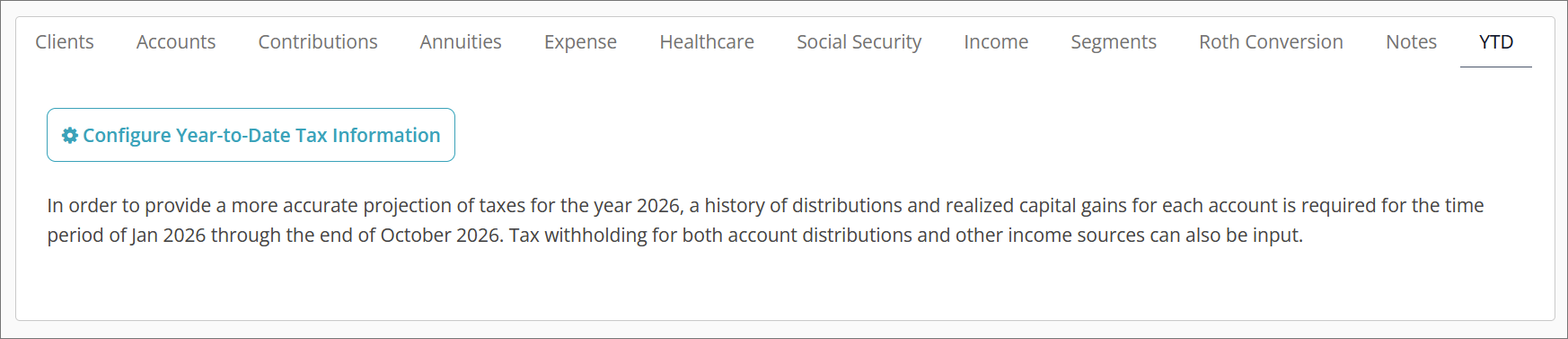
Clicking the Configure Year-to-Date Tax Information button will launch a window with tabs along the top: Income, Social Security, Accounts, and Annuities. The inputs between these tabs vary to fit the type of data applicable.
Income
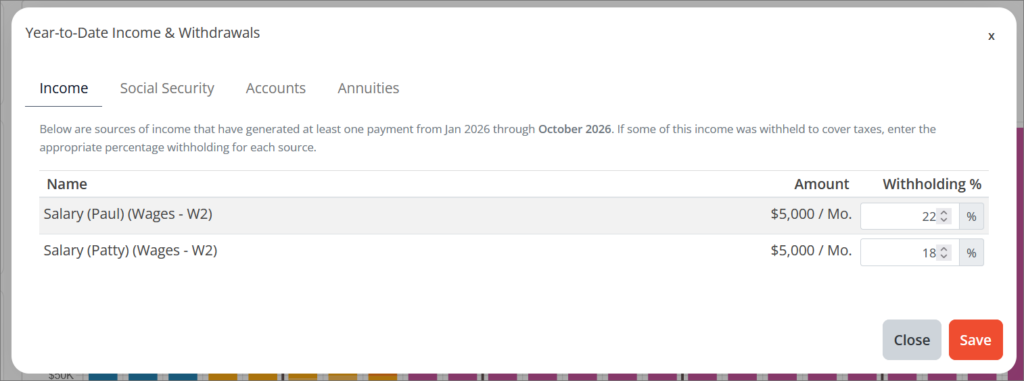
Any items entered in the Income tab of the editor that has a start date of the current month or earlier will appear in the Income tab of the YTD window. Elapsed income from these sources is automatically included in the tax calculations of the current year for the plan. Sources that start any time from the next month or later will not appear in the YTD Income tab.
Withholding % allows you to enter a percentage of the elapsed income assumed to have been withheld and sent to the IRS on the client’s behalf. Entering an accurate withholding rate will prevent the system from simulating additional account withdrawals in the remainder of the year to pay for taxes generated by the elapsed income. For example, if there has been $50,000 of elapsed income for the year and a 10% Withholding % is entered, $5,000 is treated as placed in escrow.
Withholding values can be entered from 0-100%. Withholding % can also be entered in the Add/Edit window accessible via the Income tab⚙️button. Updates made in that window will be reflected in the YTD tab and vice versa.
Social Security
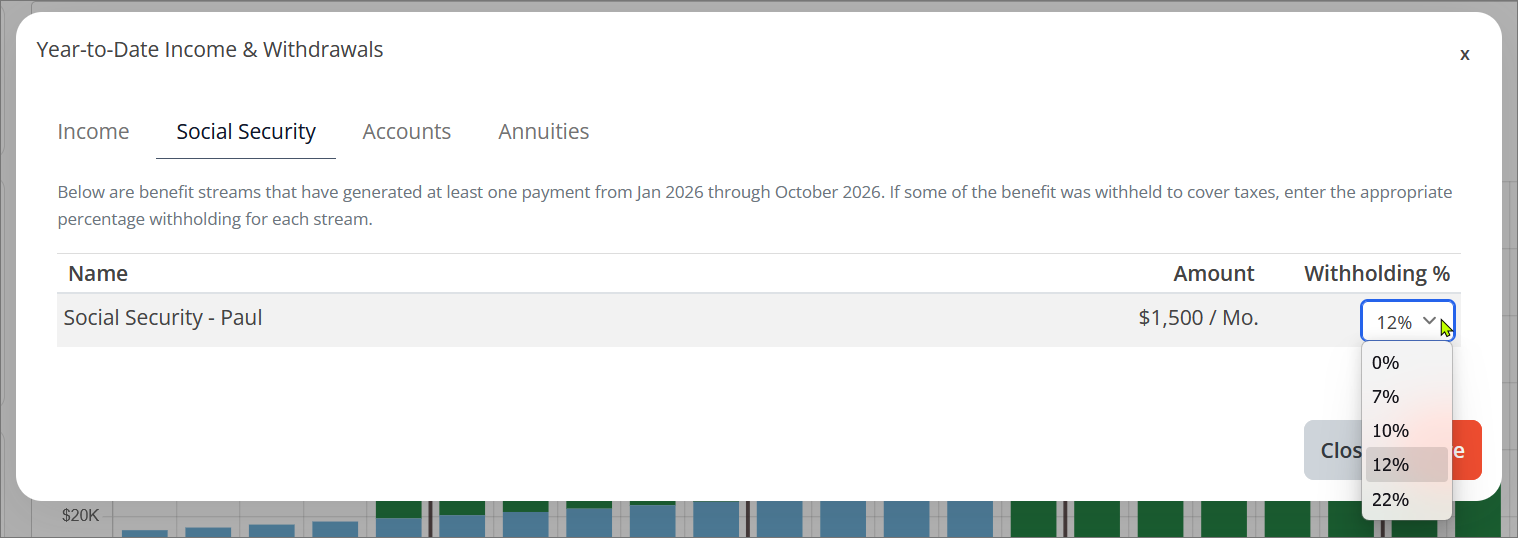
Any clients who have the option Already Claimed enabled via the Configure Claim Strategy button under the Social Security tab will appear in the Social Security tab of the YTD window. Clients who have a future claim date modeled will not appear.
Withholding % allows the selection of one of the five options for tax withholding offered by the Social Security Administration. Any benefits assumed to have already been received in the current year will have the selected percentage placed in escrow to satisfy a portion of the household’s total tax liability for the year. Any chosen withholding will have no impact on Medicare premiums or IRMAA surcharges.
Withholding % can also be selected in the Configure Claim Strategy window accessible via the Social Security tab. Updates made in that window will be reflected in the YTD tab and vice versa.
Accounts
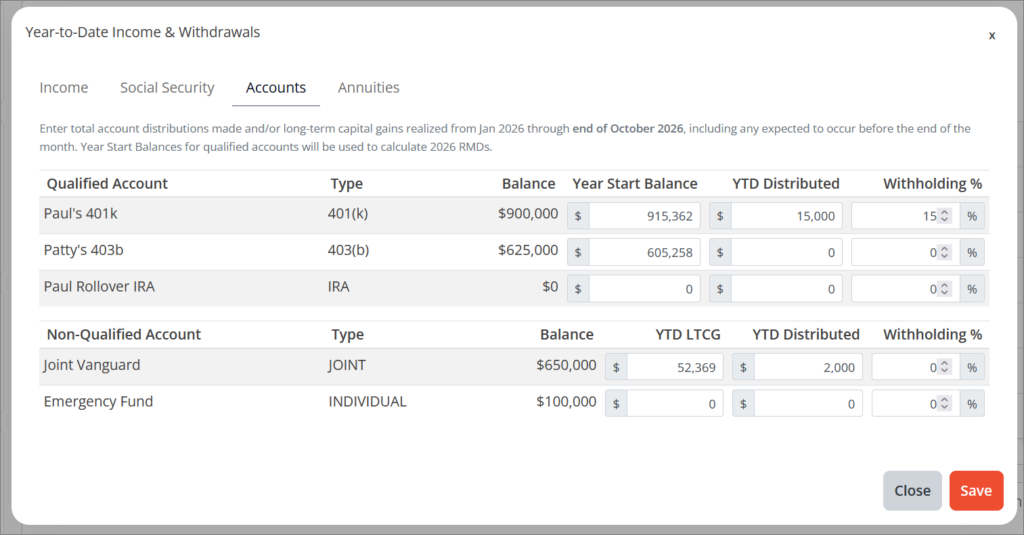
All qualified and non-qualified accounts, both segmented and non-segmented, will appear in the YTD Accounts tab and are separated into two tables. Inputs vary based on the registration type of the account.
Qualified accounts:
Year Start Balance is used to calculate the account owner’s RMD obligations for the current year. If known, enter the balance of the account as of December 31st of the prior year. By default, the current balance of the account is assumed as we do not collect historical balances from our 3rd party integrations.
YTD Distributed allows you to enter any distributions taken from the account for the date range stated in the descriptive text above the table. If the client plans to take a distribution during the remainder of the current month, include it in the figure entered. Figures entered here will not affect assumed current account balances.
Withholding % allows you to enter a percentage of the elapsed distribution assumed to have been withheld and sent to the IRS on the client’s behalf. Entering an accurate withholding rate will prevent the system from simulating additional account withdrawals in the remainder of the year to pay for taxes generated by elapsed distributions. Withholding values can be entered from 0-100%.
Non-Qualified Accounts:
YTD LTCG (Year-to-Date Long Term Capital Gains) allows you to enter the total amount of long-term capital gains that have been realized in this account for the date range stated in the descriptive text above the table. If the client plans to perform a sale during the remainder of the current month, include the estimated gains that will be realized in the figure entered.
YTD Distributed allows you to enter any distributions taken from the account for the date range stated in the descriptive text above the table. If the client plans to take a distribution during the remainder of the current month, include it in the figure entered.
Figures entered here will not affect assumed current account balances and are mainly for illustrative purposes on the Assets -> Withdrawals (segmented accounts) or Income -> By Source (non-segmented accounts) view. Even when YTD LTCG is non-$0, if the cash generated by the sale of assets did not leave the account, YTD Distributed should remain $0.
Annuities
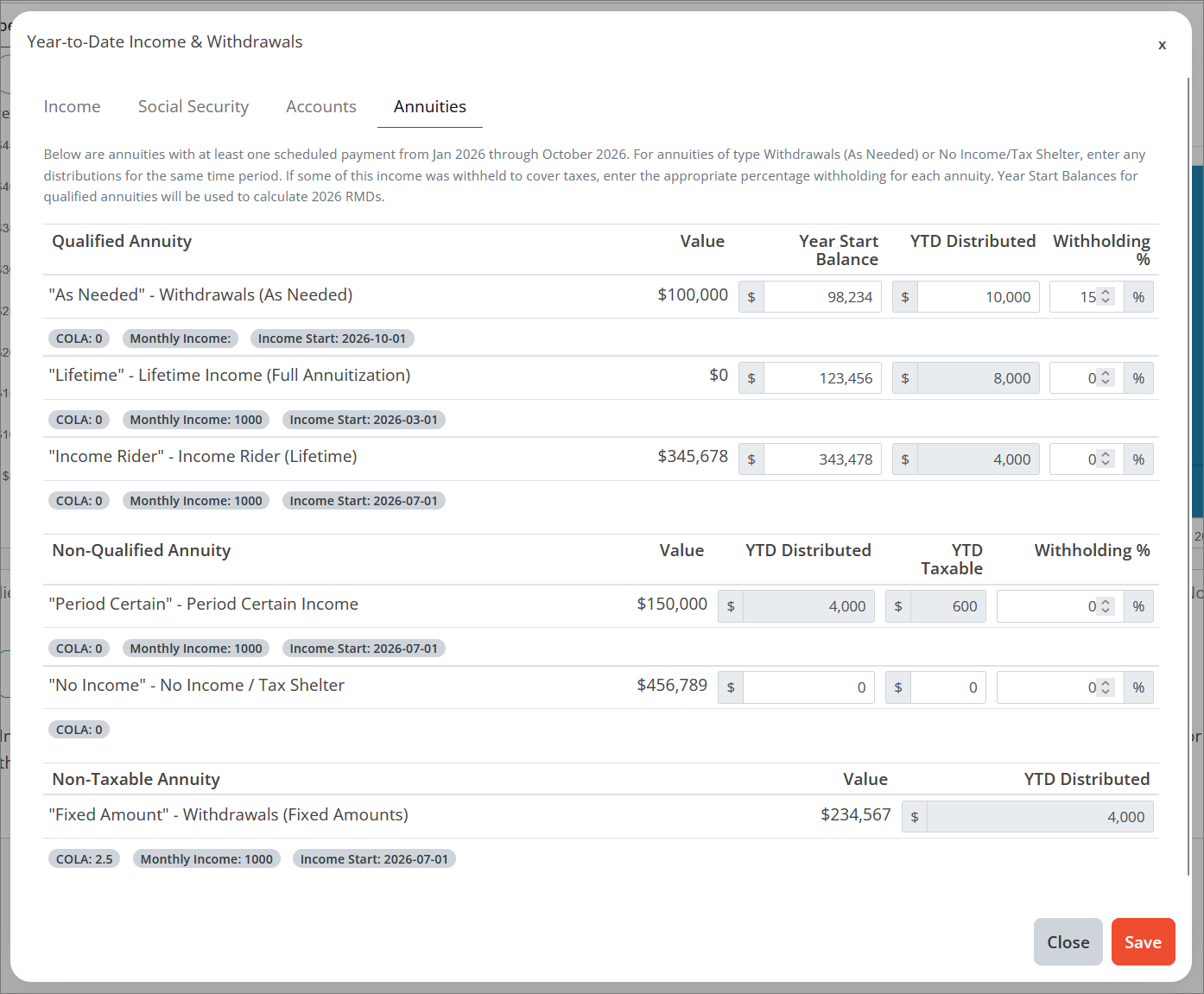
All annuities that are either of income type “Withdrawals (As Needed)” or “No Income / Tax Shelter”, or annuities with contractual income that has already elapsed in the year will appear here. The elapsed income for those annuities with contractual income or “Withdrawal (Fixed Amounts)” is automatically calculated and cannot be edited in this window. To change the income characteristics of these products, edit them from the Annuities tab of the Pro editor.
Annuities that are planned for purchase in the future will be referenced at the bottom of the window, but no inputs are available for them. Annuities are separated into one of three tables based on whether they are Qualified (IRA), Non-Qualified, or Non-Taxable (Roth).
Annuity COLAs, specified monthly income, and either specified or calculated income start date will appear beneath annuity descriptions in the tables.
Qualified Annuities:
Year Start Balance is used to calculate the annuity owner’s RMD obligations for the current year. If known, enter the balance of the annuity as of December 31st of the prior year. By default, the current balance of the annuity is assumed as we do not collect historical balances from our 3rd party integrations.
YTD Distributed allows you to enter any distributions taken from the annuity for the date range stated in the descriptive text above the table. If the client plans to take a distribution during the remainder of the current month, include it in the figure entered. Figures entered here will not affect assumed current annuity balances. This field is not editable for contractual or “Withdrawals (Fixed Amount)” income type annuities.
Withholding % allows you to enter a percentage of the elapsed distribution assumed to have been withheld and sent to the IRS on the client’s behalf. Entering an accurate withholding rate will prevent the system from simulating additional account withdrawals in the remainder of the year to pay for taxes generated by elapsed distributions. Withholding values can be entered from 0-100%.
Non-Qualified Annuities:
YTD Distributed allows you to enter any distributions taken from the annuity for the date range stated in the descriptive text above the table. If the client plans to take a distribution during the remainder of the current month, include it in the figure entered. Figures entered here will not affect assumed current account balances. This field is not editable for contractual or “Withdrawals (Fixed Amount)” income type annuities.
YTD Taxable allows you to enter the portion of annuity distribution that was considered earnings vs. principal and is thus taxable. This figure cannot exceed the YTD Distributed figure. For contractual income annuities, this will automatically be calculated using either the provided exclusion ratio, or estimated proportion of earnings vs. principal using the basis.
Withholding % allows you to enter a percentage of the elapsed distribution assumed to have been withheld and sent to the IRS on the client’s behalf. Entering an accurate withholding rate will prevent the system from simulating additional account withdrawals in the remainder of the year to pay for taxes generated by elapsed distributions. Withholding values can be entered from 0-100%.
Non-Taxable Annuities:
YTD Distributed allows you to enter any distributions taken from the annuity for the date range stated in the descriptive text above the table. This range will always be from January of the current year, through the end of the current month. If the client plans to take a distribution during the remainder of the current month, include it in the figure entered. Figures entered here will not affect assumed current annuity balances. This field is not editable for contractual or “Withdrawals (Fixed Amount)” income type annuities, and is mainly for illustrative purposes in the Income -> By Source view.